Run your meet. Let MeetMaker run the paperwork.
MeetMaker is online registration, payment collection and event management built for
event directors. List your meet, camp, clinic or ticketed event, and clubs register
themselves, pay online, and land in your entry list already organized by level and team.
List Your Event Today »
Talk to Us First
Event directors have been running events on MeetMaker since 2007.
Setting up a listing is free – you only pay when your event goes live.
About the screens on this page: they are real screens from MeetMaker, filled with a
demonstration event. Every athlete and coach name, every date of birth, every membership or
organization number, every dollar figure and every business name – gyms, clubs,
venues and banks alike – is fictional and was made up for this page. No real
person's information and no real business appears anywhere on it. Any name here that happens
to match a real person or a real business is purely coincidental.
Why directors move to MeetMaker
The same meet, without the paper chase
Most of the work in running an event is not the competition – it is chasing entry forms,
re-typing rosters, reconciling checks and answering the same questions from twenty clubs.
MeetMaker takes that off your desk.
| The job |
Doing it by hand |
With MeetMaker |
| Collecting entries |
Emailed spreadsheets and PDFs, each in a different format |
Clubs enter their own athletes off their own roster. Nothing is re-typed – and for a USA Gymnastics meet, entries come straight out of the Reservation System. |
| Taking payment |
Checks in the mail, trips to the bank, entries held until the check clears |
ACH bank draft or card at checkout. You see what has cleared in real time. |
| Enforcing your rules |
Reading every form to catch a missing membership number or an over-full session |
Registration limits, deadlines, required coach contacts and membership numbers are enforced as the club types. |
| Scratches and refunds |
A running list somewhere, and a check to write afterwards |
Scratch or refund from the dashboard. The money moves back through the same channel. |
| Getting data into scoring |
Manual entry the night before, and the corrections that follow |
ProScore, ScoreKing and Gym Art pull the entries straight out of MeetMaker. Everything else exports in the format it expects. |
| Admission at the door |
A cash box, a float, and a queue |
Tickets sold in advance, scanned from a phone at the gate. |
Step one
Set your event up once, in one pass
The Event Wizard walks you through the whole listing – dates, venue, contacts, logo,
registration window, competition levels and anything you want to sell. Save it, and our team
reviews and approves the listing before it appears publicly.
Event details, venue and contacts. Your logo appears on the listing, the registration pages and every confirmation email.
Open and close dates, an optional late window with its own fee, and a total entry cap. Deadlines run to midnight in your event's own time zone.
Every level carries its own entry fee, late fee, age date, entry cap and team rules. Group several
levels into one team award with a Team Group name, and change all of them at once with Mass Update.
Sell shirts, programs, banner space or gift bags alongside the entry – with sizes, quantity limits and sales tax where it applies.
- Copy last season. Start a new listing from a previous event and every setting comes with it.
- One form, no surprises. Required fields are marked, and the page tells you which field is wrong instead of failing on save.
- Your own refund policy and registration instructions are shown to clubs before they pay.
- Schedules and forms can be uploaded to the listing at any time, before or during the event.
- Nothing goes live by accident. Listings are reviewed and approved before they appear in the public directory.
Step two
Clubs find your event and register themselves
Your approved listing appears in the public event directory with everything a club needs to decide:
dates, venue, levels and fees, what is for sale, your refund policy and how to reach you.
The public events directory, searchable by name, city or state.
Your listing page. Register Now goes straight into entry; Buy Tickets goes to your admission sales.
What the club sees. Their roster is already sorted into your levels, with the fee for each one shown.
They tick who is coming, pick sizes, flag team members and continue – you receive it structured, not as a spreadsheet.
Your rules, enforced at the point of entry – required coach contact details, membership numbers, and your own instructions in front of them.
Clubs keep a roster in MeetMaker and import it from their sanctioning body, so athlete details and membership numbers are right before they ever reach you.
- Entry caps are enforced live – per level and for the event as a whole – so a session cannot be oversold.
- Late registration opens automatically at your late fee when the regular window closes.
- Petitions and alternates can be accepted separately and held for your approval before they are charged.
- Team entries are built from the athletes already entered, using the team rules you set on each level.
- Individual entry is available too, for camps, clinics and events where athletes sign up for themselves.
- Sanctioned by USA Gymnastics? Then this page is not where your clubs start – they reserve in the USA Gymnastics Reservation System and the reservation becomes the entry, already checked against USA Gymnastics' own records.
Step three
The money is collected, tracked and sent to you
Clubs pay at checkout by ACH bank draft or credit card. MeetMaker collects it, holds it while it clears,
and transfers it to your event's bank account – and you can watch every step of that from the dashboard.
Every transfer, itemized: what was collected, the rate applied, what was withheld, what was refunded
and what landed in your account. Expand any row to see the registrations behind it.
Pending, escrow, paid
The summary separates money still pending, money cleared and waiting to be transferred, and money already disbursed – so you always know what is actually yours.
Refunds without checks
Refund a scratched athlete from the dashboard and it goes back the way it came, whether the money is still in escrow or has already been sent to you.
Pay codes
Issue a pay code that covers a club's fees – a percentage or a fixed dollar amount, for the whole event or a single level – and it is settled against your own account.
You choose who pays the online processing fee. Either your registrants pay it at checkout,
or you absorb it and it is deducted from your transfer. Either way it is shown on the transaction,
never buried.
Step four
Everything you need on meet weekend
The Event Director dashboard is the live picture of your event: who has entered, who has paid,
who has scratched, and what still needs a decision from you.
Every club, its entry count and its payment status at a glance. Expand a club to see each athlete.
Export clubs, competitors and coaches straight into your scoring or event management system – or skip the file entirely and let your scoring system pull the entries itself.
Reports for the jobs that always come up – team counts, scratches, apparel by team or athlete, item sales, ticket sales and refunds.
- Bulk email every registered club at once, with a copy to you.
- Upload schedules and forms to the listing so clubs stop emailing to ask for them.
- Approve or decline petitions and alternates in one place, and only then are they charged.
- Process scratches and refunds without leaving the page.
- Apparel counts broken out by team, level and athlete for your supplier order.
Scoring system integration
Your scoring system pulls the entries itself
ProScore, ScoreKing and Gym Art connect directly to MeetMaker through our registration API.
There is no file to export, no email to send and no roster to re-type. You give your scoring
software one ID, and it reads your clubs and competitors straight out of MeetMaker – as
often as you like, right up to the moment the first athlete salutes.
 ProScore
 ScoreKing
 Gym Art
1
Copy one ID
Open your event and the Event Director dashboard shows it at the top: your
USA Gymnastics sanction number if the meet is sanctioned, or your
MeetMaker Event ID if it is not. That is the whole set-up.
2
Paste it into your scoring software
ProScore, ScoreKing and Gym Art each have a MeetMaker screen built in. Enter the ID
there and pick what you want – gymnasts, coaches, or both.
3
Pull the entries
Clubs and athletes arrive already formatted for that system, with levels, divisions
and team assignments intact. Nothing is typed twice and nothing is transcribed wrong.
- Pull again whenever you want. Late entries, level changes, added coaches, scratches – run it again and the roster in your scoring system matches the roster on the entry page. No merge, no diff, no wondering which version is current.
- Clubs and athletes both. The club record carries the official and short name, club number, address, contact name, phone and email. The athlete record carries name, date of birth, gender, level and division, membership number, club, up to three team assignments, apparel size, citizenship and any registration notes.
- You decide what goes across. Include or exclude scratches, late registrations, alternates and petitions; treat every gymnast as a team member; include sub-levels; strip the state prefix from club names. Your settings, not our assumptions.
- Registrations go out, and nothing comes back. MeetMaker never asks for your scores – scoring, judging and results stay entirely inside your scoring system, where they belong.
Using something else? You are still covered. The File Download tab builds a purpose-made
export for ProScore 4, ProScore 5, Score Master, NetScore, Beyond The Scores, NinjaWorks and
Gym Art – each with the exact columns, ordering and quoting that system expects, not a
generic spreadsheet you have to rework. Coaches export separately with their certification and
expiry dates, and you can pull everything or only what has changed since your last download.
Step-by-step upload instructions for ProScore, Score Master and NetScore are linked on the page.
And if your system is not on the list, tell us which one you use.
Adding a new download profile is routine work for us.
ProScore, ScoreKing and Gym Art are the trademarks of their respective owners and are shown to
indicate supported scoring systems. Their use here does not imply endorsement.
Optional
Sell admission tickets and scan them at the door
Add a ticketed listing alongside your meet – or on its own. Spectators buy in advance or at the
gate, and your volunteers scan the QR codes from their own phones. No cash box, no bank run, no queue.
Your ticket listing, linked from the meet page. Single-day, multi-day and re-entry passes, each priced separately.
You hand your gate volunteers a URL and a code. They do not need a MeetMaker account, and you can test the scanner before the doors open.
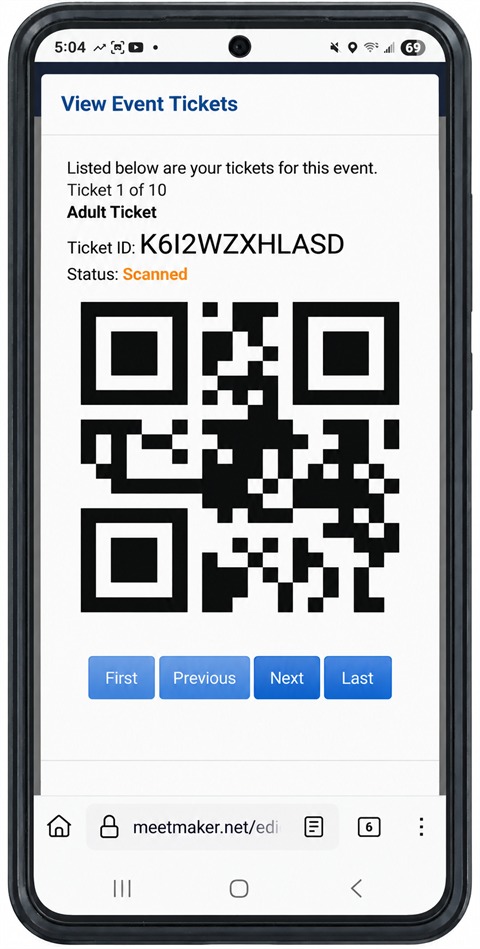
A ticket as the spectator sees it, on the phone they will hold up at your gate.
This is the whole ticket. No app to install, no wallet pass, nothing to print.
The buyer opens the link in their purchase email and pages through what they bought
– Ticket 1 of 10 here – one QR code at a time, so the person on the
gate is looking at exactly one ticket and cannot scan the wrong one by mistake.
Each carries its own ID, and its own status: this one already reads Scanned,
which is what a second attempt at the door would be told.
Your side of it is a phone too. Gate volunteers open the scanning page in a browser,
sign in with the code you give them, and point the camera – a green screen and a
sound for a good ticket, red for one that is spent, out of window or not yours. No
hardware to hire, and no reason to own a scanner you use twice a year.
- Every ticket is unique to your event and cannot be reused once scanned, unless you allow re-entry.
- Set the scanning window so a Saturday ticket only works on Saturday, and re-entry stops when you say it does.
- Buyers do not need an account – they can check out as a guest and pull their tickets up from the purchase email.
- Live sales figures while the event is running, so you know what is coming through the door.
USA Gymnastics Reservation System
Every entry arrives through the USA Gymnastics Reservation System
MeetMaker is a meet registration company inside the USA Gymnastics Reservation System.
Name us on your sanction and, from that moment, every club coming to your meet reserves through
USA Gymnastics first – and each reservation lands in MeetMaker as a ready-made entry, carrying
the names, dates of birth, membership numbers and levels exactly as USA Gymnastics holds them.
Adds, level changes and scratches keep arriving the same way right through to meet weekend.
Nobody re-types anything, and your entry list cannot drift out of step with theirs.
First, your sanction switches it on
Two steps, once per meet.
1
Your sanction becomes an alert
Apply for the sanction as you always do and pick MeetMaker as the meet
registration company. USA Gymnastics sends it to us, and it is waiting on your
Alerts page the next time you sign in – meet name, dates, venue and every
competition level you sanctioned.
2
Process it into a listing
Click Process and the Event Wizard opens already filled in from the sanction. You
add your fees, deadlines and items, and save. Already listed the meet? Type the
sanction number into it instead and the two are linked. Either way, the meet is now
live in the Reservation System.
Your Alerts page. A new sanction arrives here on its own – Process opens the Event Wizard
prefilled from it. Add or remove a level on the sanction later and a fresh alert tells you the
meet needs bringing back into step, instead of the two quietly drifting apart.
Then every entry, all season, comes through the Reservation System
This is the part that runs your registration period. It is the same four steps for the first
club and the last, and for every change in between.
1
The club reserves with USA Gymnastics
A club that clicks Register on your listing is sent into the Reservation System
first, and picked up again on the way back. There is no way round it, so every
name on your entry list started as a USA Gymnastics reservation.
2
The reservation becomes their alert
It is waiting on the club's own Alerts page when they come back – every gymnast
and coach they reserved, at the level USA Gymnastics has them at, with the
membership number to match. Nothing to forward, chase or key in.
3
Process turns it into an entry
One click opens their registration with every reserved athlete already selected
at their own level, and locked to what was reserved. The club adds sizes and teams,
pays, and the entry is on your list.
4
And it keeps working
Adds, level changes and scratches arrive the same way for the rest of the
registration period. A level change that costs more is collected before it is
applied; a scratch needs nothing from the club at all.
A reservation as it arrives, expanded: every gymnast and coach on it, what USA Gymnastics
is asking for – Add, Update or Scratch – and the level and
membership number for each. Process is the club's whole job here.
- Your entry list matches theirs. Every athlete's name, date of birth, membership number and level comes from USA Gymnastics, not from a form somebody filled in.
- Petitions and alternates, one athlete at a time. A club can pull a single gymnast off a reservation as a petition or alternate; it waits for your approval and is only charged once you say yes.
- Your levels stay in step. Change the levels on the sanction and a fresh alert brings the meet back into line, so the Reservation System never offers a level you are not running.
- Nothing is stranded. A reservation asking for a level your meet does not have raises a support ticket naming the level and the club, instead of leaving them stuck on a message they cannot act on.
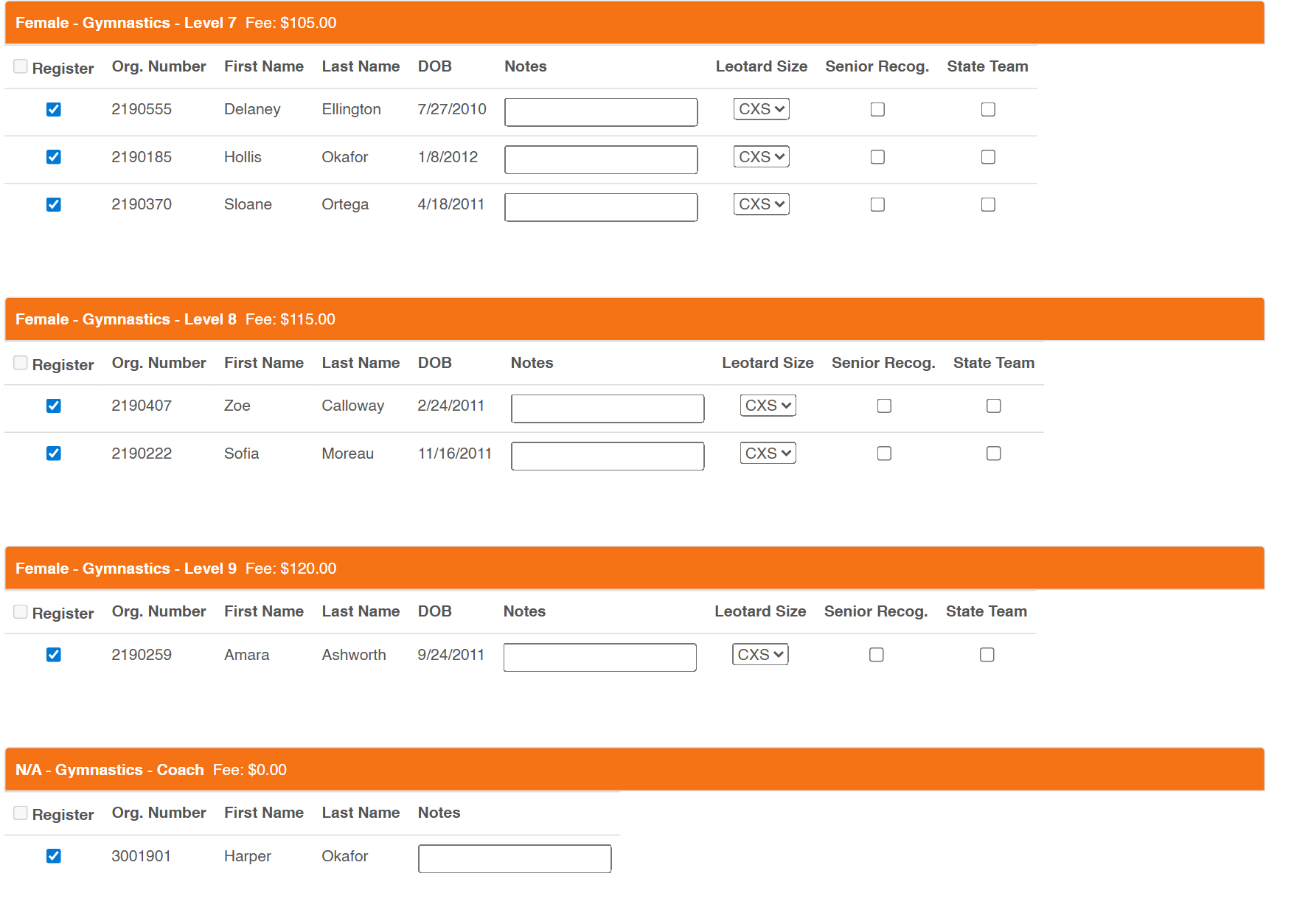
One click later: the same seven people from that reservation, already ticked, each under the level
they reserved at with your fee for it beside them. The club fills in sizes, adds teams and pays
– and it reaches you as a structured entry, not an attachment.
Step-by-step, for you and for your clubs. Our
USA Gymnastics Reservation System page has full
instructions and a short video for both sides of this – a Registering Gyms tab
walking a club from reservation to completed registration, and a Meet Directors tab
covering linking a new or existing meet to a sanction. Send the first one to any club that
has not done it before.
What it costs
Straightforward, and nothing until your event is live
There is no subscription and no charge for building a listing. There are three things that can
appear on an event, and you will know all three before you go live.
1. Event listing fee
A one-off fee for listing the event, quoted when your listing is approved and collected from the account you nominate.
2. Online processing
A percentage of what is collected online, for taking and moving the money. You decide whether your registrants pay it at checkout or you absorb it.
3. Card surcharge
Cards cost more to accept than an ACH bank draft, so a surcharge applies when the payer chooses a card. Paying by ACH bank draft avoids it entirely.
Rates depend on the size and type of your event. Get in touch and we will
give you the numbers for yours before you commit to anything.
All personal and business names, dates of birth, membership and organization numbers, and dollar
amounts appearing in the screenshots on this page are fictional and were created for demonstration
purposes only. Any name that matches that of a real person or a real business is purely coincidental.
We use essential cookies for website functionality only. By using this site, you acknowledge our
Privacy Policy.